
AI hairstyle try-on for iPhone and Android
Try the cut before the salon.
Try haircuts and hair colours on your own selfie, then show your stylist exactly what you want.


- Hair profile before you pay
- Curly & coily styles
- No ads

Before

Curtain Bangs · Toasted Chestnut

Italian Bob · Cinnamon Auburn

Butterfly Cut · Teddy Bear Bronde

Whisky Copper
Cuts, colours and bangs to try
Bobs, butterfly cuts, curtain bangs, balayage, copper and more. Curly and coily hair gets its own catalog, and we never force a straight cut onto curls.
-

Curtain Bangs Bangs
-

Butterfly Cut Cut
-
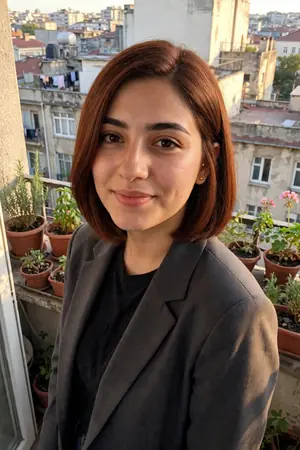
Italian Bob Cut
-
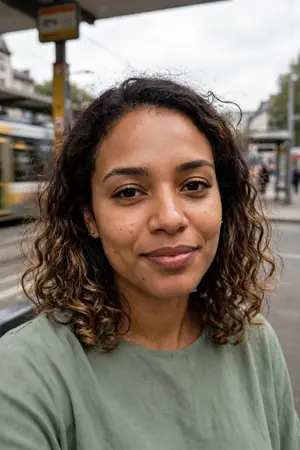
Honey Balayage Colour
-
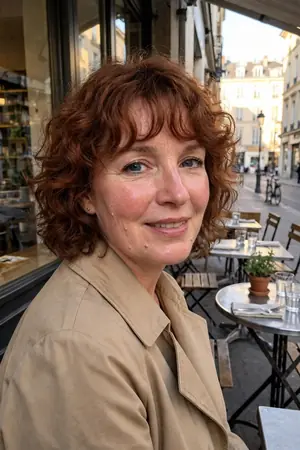
Curly Shag Curly
-
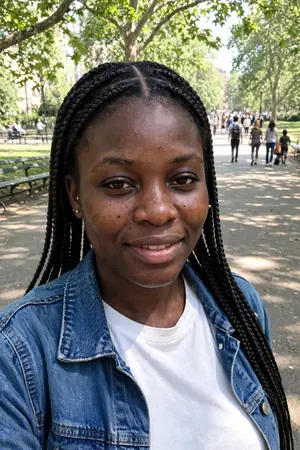
Knotless Braids Braids
-
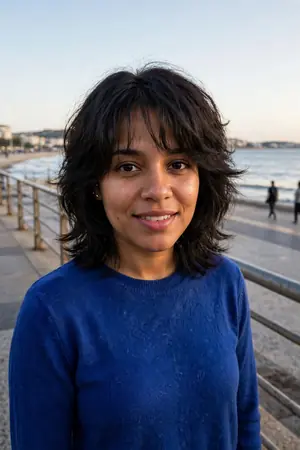
Wolf Cut Cut
-

Cherry Cola Colour
-

French Bob Bangs
-
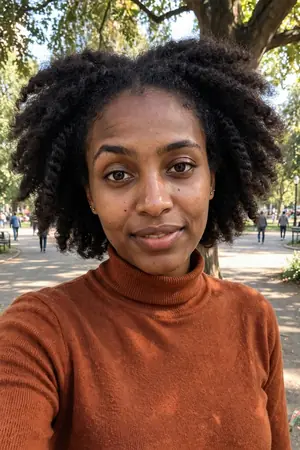
Twist Out Coily
-

Micro Fringe Bangs
-
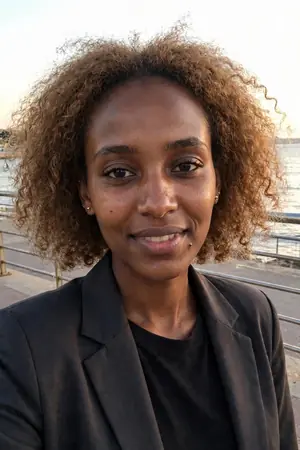
Teddy Bear Bronde Colour


Catalog photos are AI-generated with fictional models.
One selfie, many looks
Each row starts from one photo, and only the hair is edited.
Straight hair
-

Before
-

Curtain Bangs · Toasted Chestnut
-

Italian Bob · Cinnamon Auburn
-
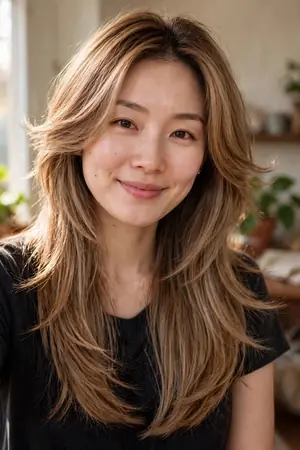
Butterfly Cut · Teddy Bear Bronde
Curly hair
-
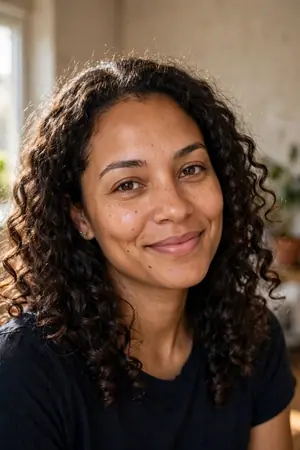
Before
-
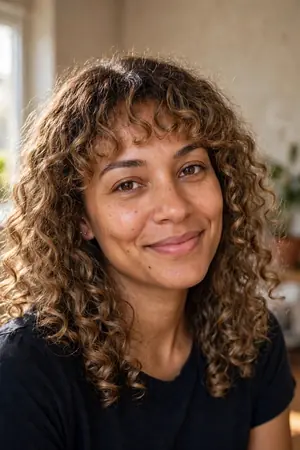
Curly Shag · Teddy Bear Bronde
-
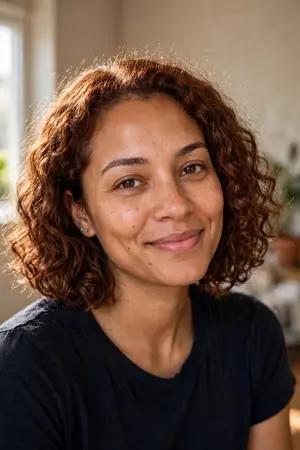
Curly Bob · Cinnamon Auburn
-
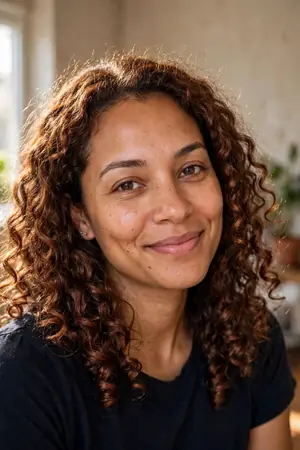
Whisky Copper


Coily hair
-
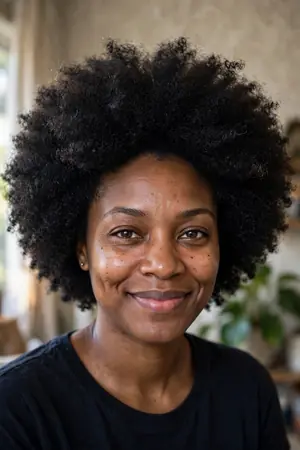
Before
-
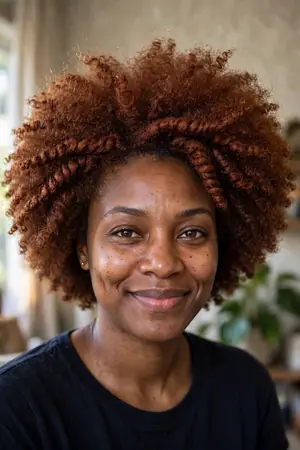
Twist Out · Cinnamon Auburn
-
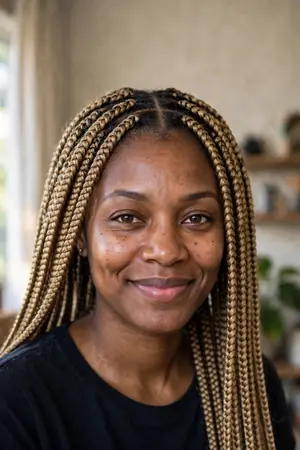
Knotless Braids · Teddy Bear Bronde
-
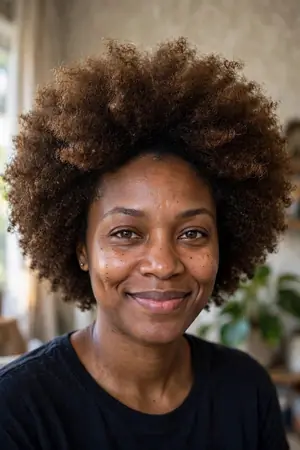
Toasted Chestnut


How it works
-

Take a selfie
Face the light, hair back, no filter. Wearing a hijab? Keep it on: head coverings are never removed.
-

Try looks on your face
Get your hair profile, with cuts picked for your face shape. Then try cuts and colours from the catalog, or copy a look you saw.
-

Show your stylist the card
Each look has a stylist card: what to ask for, the colour technique and notes about your hair. Set a reminder for your salon visit.
Made for the salon chair
-
Your hair profile
Face shape, undertone and texture, read from your selfie, with the colours that suit your undertone. Written by AI; your stylist knows best.
-
Curly & coily catalog
Curly cuts, twist outs, braids and locs, in their own catalog. Your texture stays in the render unless a look changes it, like a silk press.
-
Copy a look you saw
Saw a cut you love? Add the photo and see that hair on you. Only the hair is used.
-
Colour with layers
Pick a base colour, then add dimension, like balayage, and a tone. See the same cut in other shades.
-
Share or save
Save a 9:16 image to your Photos or share it with friends. Every saved image carries an AI label.
-
Your photos, your call
You agree before your selfie is sent, and you can delete your photos any time in Profile.
Questions
How does the AI hairstyle try-on work?
Balaya works like a haircut simulator on your own face. Take a selfie and Balaya reads your face shape, undertone and hair texture. Pick a cut, a colour or both, and AI renders that hair on your photo. You can also add a photo of a cut you saw and see it on you.
Can I try bangs before I cut them?
Yes. Curtain bangs, blunt bangs, a micro fringe or curly bangs: see them on your selfie first, since bangs take months to grow out.
Can I change only my hair colour?
Yes. Keep your cut and try a new colour, from brunette and copper to blonde, with a technique like balayage and a tone on top. Your hair profile shows colours for your undertone.
Do I need an account?
No. There’s no sign-up and no password. Purchases are linked to your Apple or Google account by the store, so you can restore them on a new phone.
How much does it cost?
Your hair analysis, the hair profile from your selfie, comes before you pay. To try looks on your selfie, you need a plan (a subscription) or a one-time pack of looks. Both are bought in the app through the App Store or Google Play, and the price is shown before you pay. A subscription renews until you cancel it: how to cancel.
Will the looks still look like me?
Balaya edits only the hair and is built to keep your face and skin tone as they are. AI can still get details wrong, so treat each look as a preview, not a promise of the salon result. If a look doesn’t look like you, tap Report on the look and tell us.
What happens to my selfie?
Nothing is sent until you agree. Your selfie then goes to our AI service providers to create your hair profile and your looks. You can delete your photos any time in Profile: your selfie and hair profile are removed from your phone, and your render history from Balaya. The Privacy Policy explains what they receive and why.
Does it work on curly and coily hair?
Yes. Curly and coily hair gets its own catalog, with curly cuts, twist outs, braids and locs, and we never force a straight cut onto curls.
I wear a hijab. Can I use Balaya?
Yes. Keep it on for your selfie. Only the hair is edited, and head coverings are never removed.
Which phones does Balaya work on?
Balaya is an app for iPhone and Android phones. Get it from the App Store or Google Play.

Walk in with a plan.
Try the cut on your selfie first, then show your stylist the card. Balaya is for iPhone and Android.